Document automation

From document intake to data delivery

Document intake, review of extracted data, approvals, and delivery into the next system.

Inside the pilot environment

See how SmartDocTO processes a document

SmartDocTO goes beyond extraction. It receives the document, prepares data for review, keeps a processing history, and delivers the result to the next system.

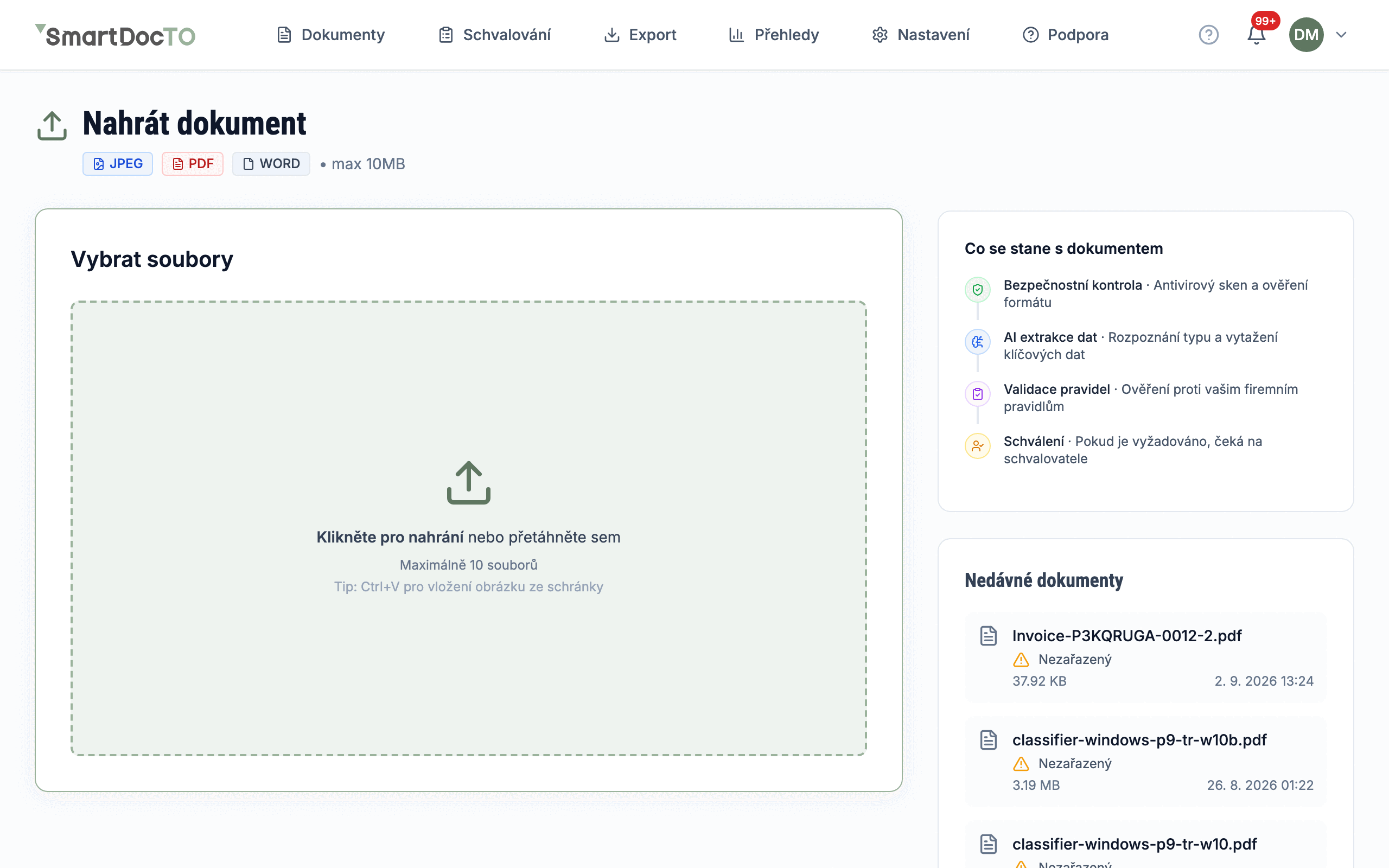
Czech SmartDocTO pilot interface showing selection of a sample file. Sample data

Step 1 of 4

Documents arrive in one place

You can upload a file directly in the application. Depending on the setup, the same process can also start from email, an API, or a secure upload link.
Real Czech pilot interface using sample data only.
1 / 4
Data extraction

Extraction based on your template

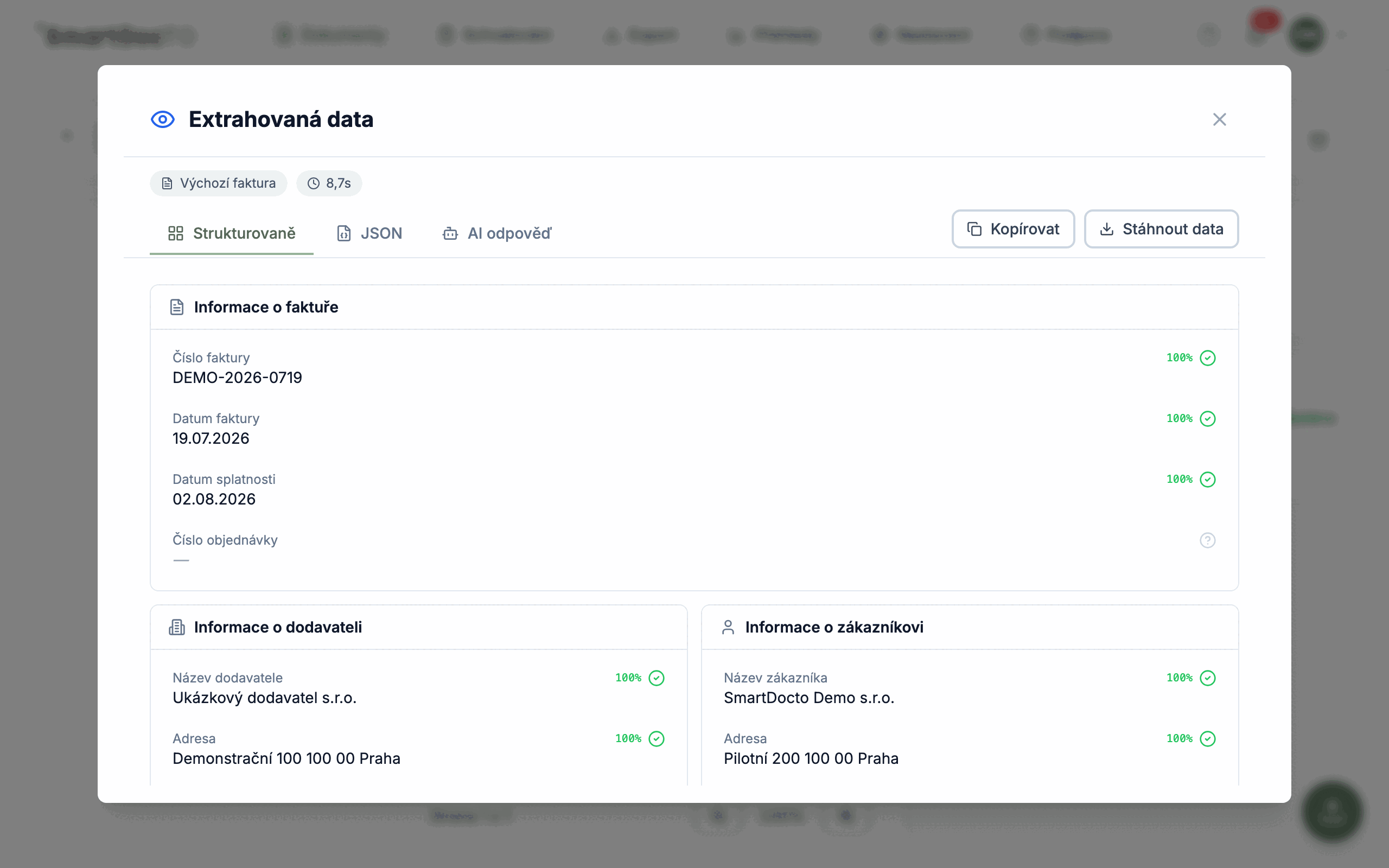
Define the fields you need in a template. AI prepares the values, while users see confidence scores and validation results.

Supported formats

Upload PDF, JPG, PNG, TIFF, XLS, or XLSX files. The technical processing path varies by format and selected AI model, but the output always follows the fields defined in the template.

Document templates

Configure sections, fields, data types, and checks for each document type. Every process gets its own output structure.

Reviewing the result

Users see the extracted value, its confidence score, and the outcome of configured rules. A failed check can stop the process or request user action, depending on the setup.

Versions and accuracy

Template changes are versioned, while field corrections feed into statistics. Teams use this evidence to refine templates and validation rules.

Intake

Receiving documents

Choose an intake channel based on where documents come from and who sends them.

Web interface

Drag individual files or batches into the browser and follow upload progress. Available limits depend on the selected plan and processing model.

Email and API

Documents can arrive from a connected mailbox or from your system through a secured API. Both channels use the same processing rules as web uploads.

External upload link

A supplier or client can upload a file through a secured link without access to the internal application. The link can have an expiry date and usage limits.

Uploading the same file twice

SmartDocTO compares file fingerprints. It stops a repeated upload of an identical file unless the user explicitly allows an exception.

Approvals

Approval process

Use approvals only where the process requires them. Rules define the responsible people and conditions.

Conditional approvals

A rule can choose an approver based on document type, amount, supplier, or another extracted value. One document can match several rules.

Deadlines and notifications

Assigned approvers receive a notification and see the due date. Once it passes, the request remains open and is marked as overdue.

Delegation

The assigned approver can manually delegate a request to a substitute. The original assignment and delegation remain in the history.

External approvers

Clients or partners approve under their own restricted accounts and see only assigned requests. Each decision is recorded under their identity.

Integrations

Connect your systems

Deliver the result through a format and channel supported by the target system. SmartDocTO does not confirm accounting entries.

Outbound integrations

Map template fields to the structure expected by an ERP, accounting platform, or another system. Transfers use a supported authentication method.

Delivery retries

If a temporary failure occurs, SmartDocTO retries at increasing intervals. An authorized user can also retry a failed delivery manually.

Reference data

Supplier, cost center, or product lists can be synchronized from an external source and used in validation rules.

Manual export and storage

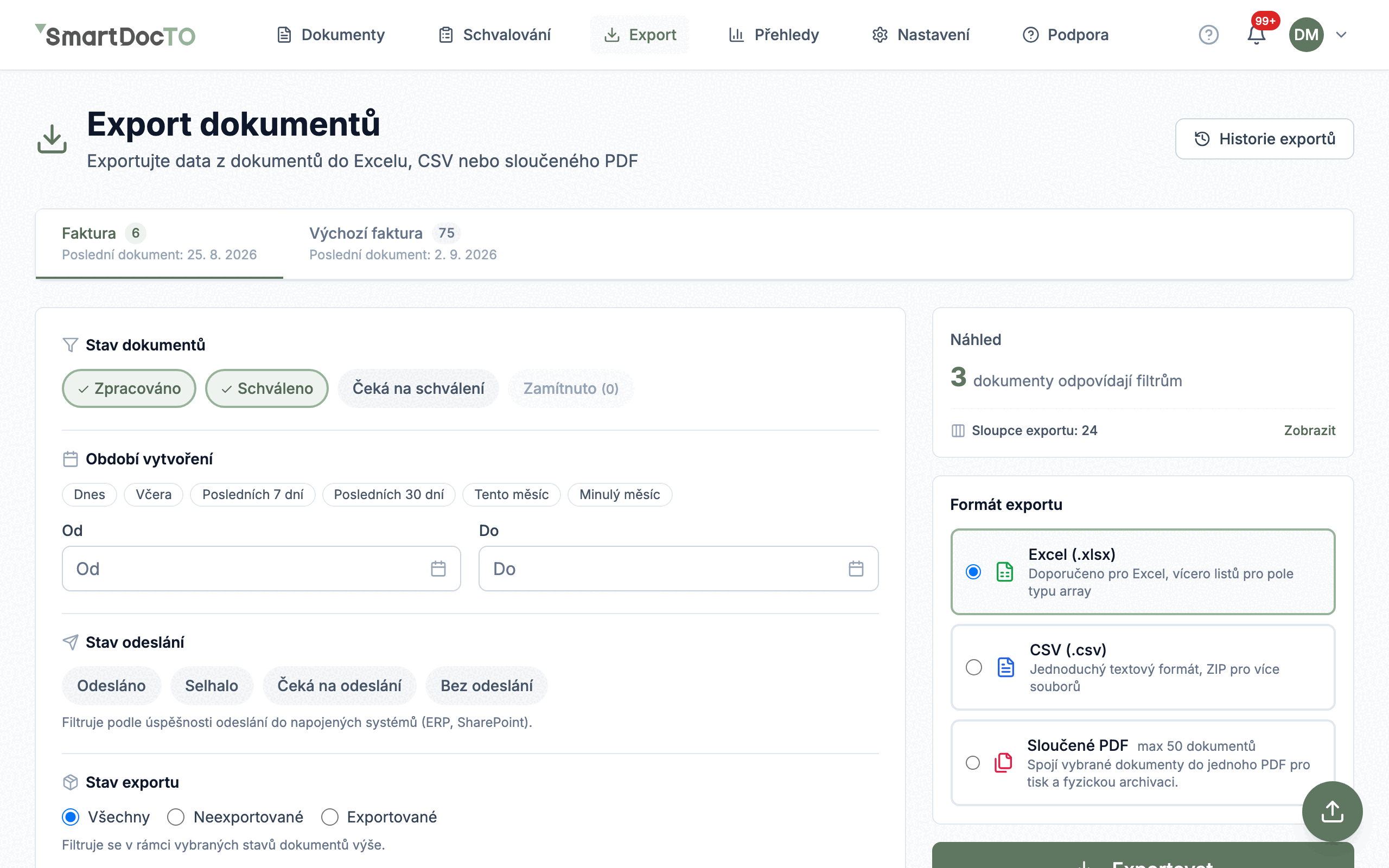
Download data as Excel or CSV. Depending on the setup, files and data can also be delivered to SharePoint, OneDrive, or SFTP.

Reporting

Reports and metrics

Track the state of the process and identify where corrections, delays, or failed deliveries occur.

Five data areas

Reports cover documents, approvals, AI usage, integrations, and corrections to extracted values. Each area has its own metrics and dimensions.

Custom dashboards

Build layouts from metric cards, charts, and tables. Save several views for different teams and share them with authorized users.

Trends over time

Filter results by period and compare selected metrics with the previous period. This helps distinguish one-off exceptions from recurring problems.

AI costs

Request counts, tokens, and response time by model help monitor technical processing usage. Data availability depends on the selected provider.

Security

Security and control

Access to documents is governed by company and user role. Important events remain available in the history.

Data protection

Communication uses an encrypted connection and sensitive integration credentials are stored encrypted. Cloud customer data is stored in the EU.

Internal and external roles

Owners, administrators, approvers, and users have different permissions. External roles separate upload, viewing, and approval from internal access.

Event history

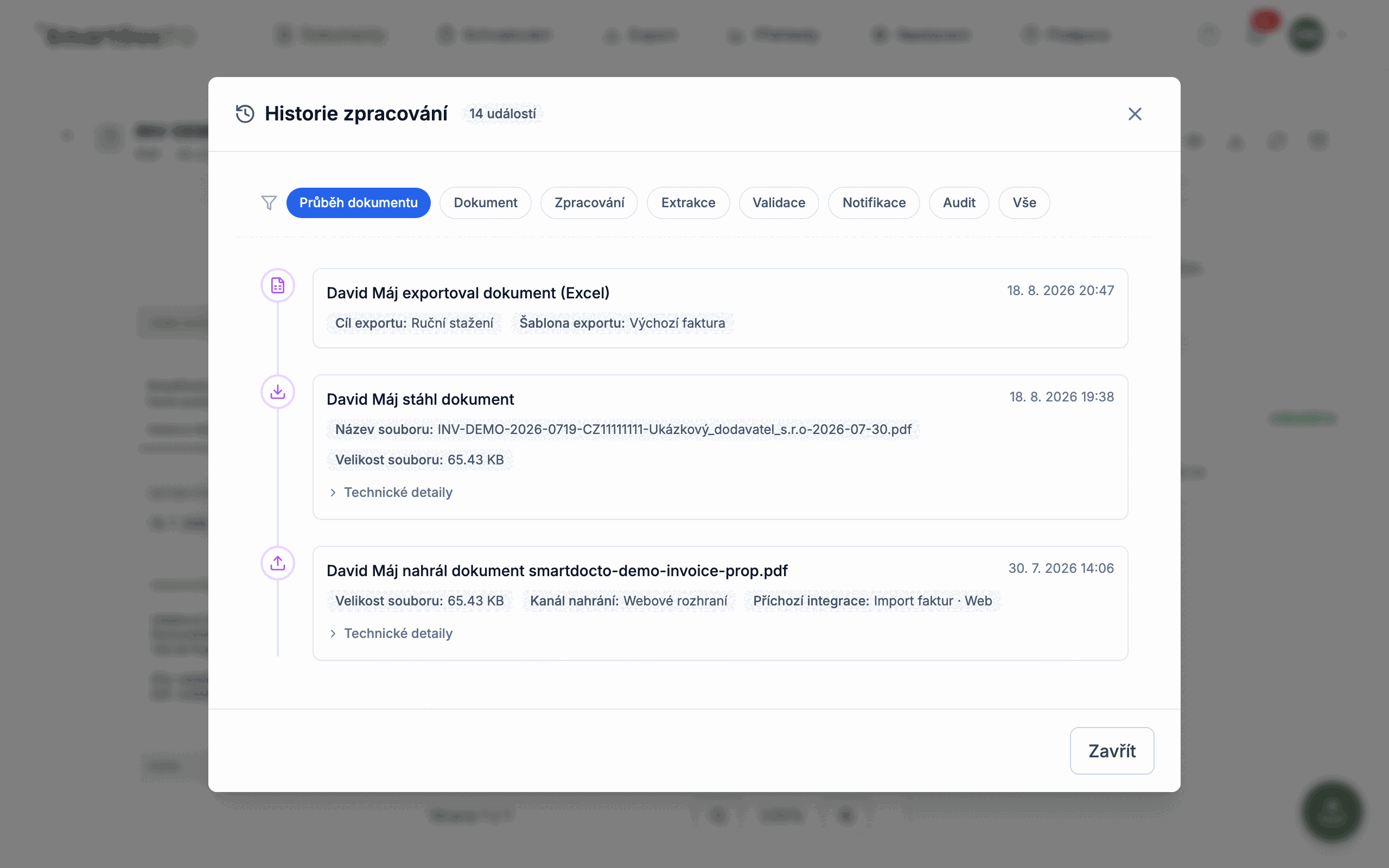
Supported processing steps, field changes, decisions, and integration delivery attempts remain traceable on each document.

File checks

Every uploaded file passes a ClamAV antivirus scan before processing. Company membership and permissions govern access to it.

Frequently Asked Questions

Frequently Asked Questions

How can documents enter SmartDocTO?
Documents can arrive through web upload, a secure external link, REST API, or an email integration. Supported inputs include PDF, JPG, PNG, TIFF, XLS, and XLSX.
How is extracted data quality checked?
Each field has a confidence score and can pass through required, format, or custom validation rules. Depending on the configuration, the result is accepted, flagged for correction, or stopped.
What is the difference between validation and approval?
Validation checks values and conditions automatically. Approval is a decision made by an assigned person. Rules determine who receives the request, the decision deadline, and whether several people must approve.
How is data delivered to an ERP or accounting system?
Outbound integrations can send approved data through REST API or SFTP, or save a file to SharePoint or OneDrive. Users can also prepare a manual Excel or CSV export.
How are companies, roles, and change history separated?
Document access is scoped by company and user role. External roles see only assigned tasks, while relevant events, edits, and decisions are stored in the document history.
Try It Out

Upload Your First Document

Use the 14-day pilot to measure extraction, validation, approval, and delivery on your own sample documents.

Try for free
Privacy controls
EU Data Hosting
Change and approval history